MSG / OFT
Outlook HTML, plain text, compressed RTF, attachments and embedded messages.
 MAILFOLIOApp Store
 EMAIL FILE VIEWER FOR MAC, IPHONE & IPAD
The email file opens here.
Got a winmail.dat instead of the attachment you expected? Open the message and preview what is inside on your Mac, iPhone or iPad. Your file is processed on your device.
Your first successful own-file import is free. No account. Saved reopens and samples remain free. Preview attachments and a watermarked PDF before choosing Pro for saving and clean exports. Need it for a short task? Check the non-renewing seven-day pass in the app. Available plans and local prices are shown before purchase.
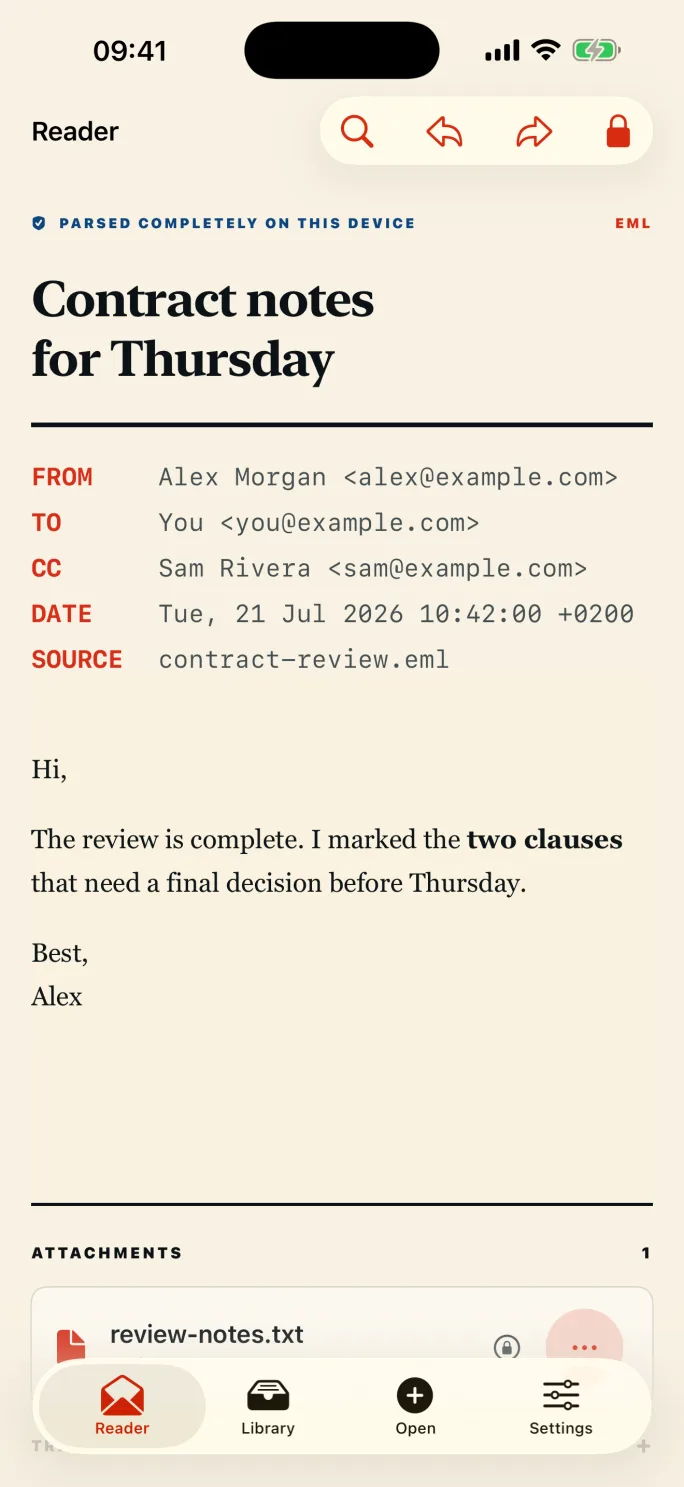
MailFolio parses message bodies, headers and attachments on your Apple device.
Remote HTML content, scripts, forms and tracking pixels are blocked inside the reader.
No login. No advertising SDK. Your email stays on this device. Optional usage counts start only after your consent.
Outlook HTML, plain text, compressed RTF, attachments and embedded messages.
MIME messages with encoded headers, inline resources and alternative bodies.
Browse multi-message archives, search the correspondence and export the entire set.
Extract classic and MAPI-packed TNEF content without hunting for a desktop converter.
Open web archives while keeping external requests and active content switched off.
Create searchable PDF, portable EML, self-contained HTML and plain-text copies.
Install MailFolio, open the MSG file from Finder or the iOS Files app, and MailFolio will decode the message and its attachments on your device.
READ THE GUIDE →WINMAIL.DATSave the Winmail.dat attachment to Files, open it with MailFolio, then read the decoded message and save any attachments you need.
READ THE GUIDE →MBOX ARCHIVESOpen the MBOX file in MailFolio, select messages from the archive list, and read or export them entirely on your Mac.
READ THE GUIDE →PRIVATE PDF EXPORTOpen the MSG file in MailFolio, choose Export → Searchable PDF, and save the generated PDF. Parsing and PDF creation happen on your device.
READ THE GUIDE →BEST MAC MSG APPChoose MailFolio to read a saved Outlook MSG on your Mac without uploading it or adding it to a mail account. Inspect the message and attachment list locally; your first successful import of a new file of your own is free. Pro adds professional attachment and export workflows.
READ THE GUIDE →BEST WINMAIL.DAT APPTry MailFolio to see what is actually inside Winmail.dat on Mac, iPhone or iPad. It decodes supported TNEF locally and shows the message and attachment list. Your first successful own-file import is free. Attachment preview is free; Pro adds attachment saving and sharing.
READ THE GUIDE →BEST EML VIEWERChoose MailFolio to read a saved EML or EMLX directly, with remote resources blocked and no mailbox import. Try it with your first successful own-file import free. Pro adds searchable PDF, EML, HTML and text exports when you need a separate copy.
READ THE GUIDE →BEST MBOX VIEWERTry MailFolio when you want to inspect an MBOX archive without mixing it into your everyday mailbox. Browse and search its messages locally on your Mac; your first successful import of a new file of your own is free. Pro adds searchable PDF exports of a message or the archive.
READ THE GUIDE →BEST IPAD VIEWERUse MailFolio to read supported MSG, EML, EMLX, MBOX, MHT, MHTML, OFT and Winmail.dat files on iPad without an account or document upload. Your first successful own-file import is free. Pro adds professional attachment and export workflows.
READ THE GUIDE →WINMAIL.DAT ON MACSave Winmail.dat from the message, then open the saved file in MailFolio on your Mac. MailFolio decodes the TNEF container on the device and shows the message details and any attachments it finds. Check the filenames before saving: the container may not include the document you expected.
READ THE GUIDE →MISSING ATTACHMENTThe PDF may be inside an Outlook TNEF container called winmail.dat. It is not necessarily lost or converted into a new document. Ask the sender to resend the original PDF as a normal attachment, or inspect the container to see which files it actually includes.
READ THE GUIDE →Use Files, Mail, AirDrop, Finder, Open In, a Home Screen quick action or a Shortcut.
Inspect recipients, dates, headers, HTML or RTF content, nested messages and every attachment.
Your first successful own-file import is free. Preview the actual attachment or watermarked PDF; choose Pro when you need attachment saving or clean exports.
MAILFOLIO PRO
Unlimited opening and every professional export on iPhone, iPad and Mac. Subscriptions renew automatically until cancelled in your Apple Account. Lifetime is a one-time purchase.
Download on theApp StoreNo. File parsing and rendering happen on your device. MailFolio contains no account system, advertising SDK or conversion-server integration.
MailFolio handles the common MSG, OFT, EML, EMLX, MBOX, MHT, MHTML and Winmail.dat variants. Encrypted, malformed or proprietary future variants may not decode completely.
Your first successful import of a new file of your own is free. Reopening saved files and using samples remain free. Preview attachments and a watermarked PDF for free; Pro adds attachment saving, unlimited new imports and clean exports. Choose a non-renewing seven-day Pro pass for a short task, an auto-renewing monthly or annual subscription, or a one-time lifetime purchase. The app shows the available plans and your local App Store price before purchase.
Save the attachment to Files, then share or open it with MailFolio. Use your one free successful own-file import to check that the message body and attachments are readable before choosing Pro.
English, Italian, German, French, Spanish, Brazilian Portuguese, Dutch, Japanese and Simplified Chinese.